Cafe POS

Cafe POS Software for Faster Service and Better Business Control

Run your café, coffee shop, or related business with a POS built around the way modern cafés work. SalesPlay POS helps you manage coffee, drinks, food, takeaway and dine-in orders from one simple system. Take orders faster, handle custom drinks, manage payments, and monitor your café’s performance.

Everything You Need to Run Your Café

From the first coffee order of the morning to the last sale of the day, SalesPlay POS helps your team keep things moving.

Fast Order Taking

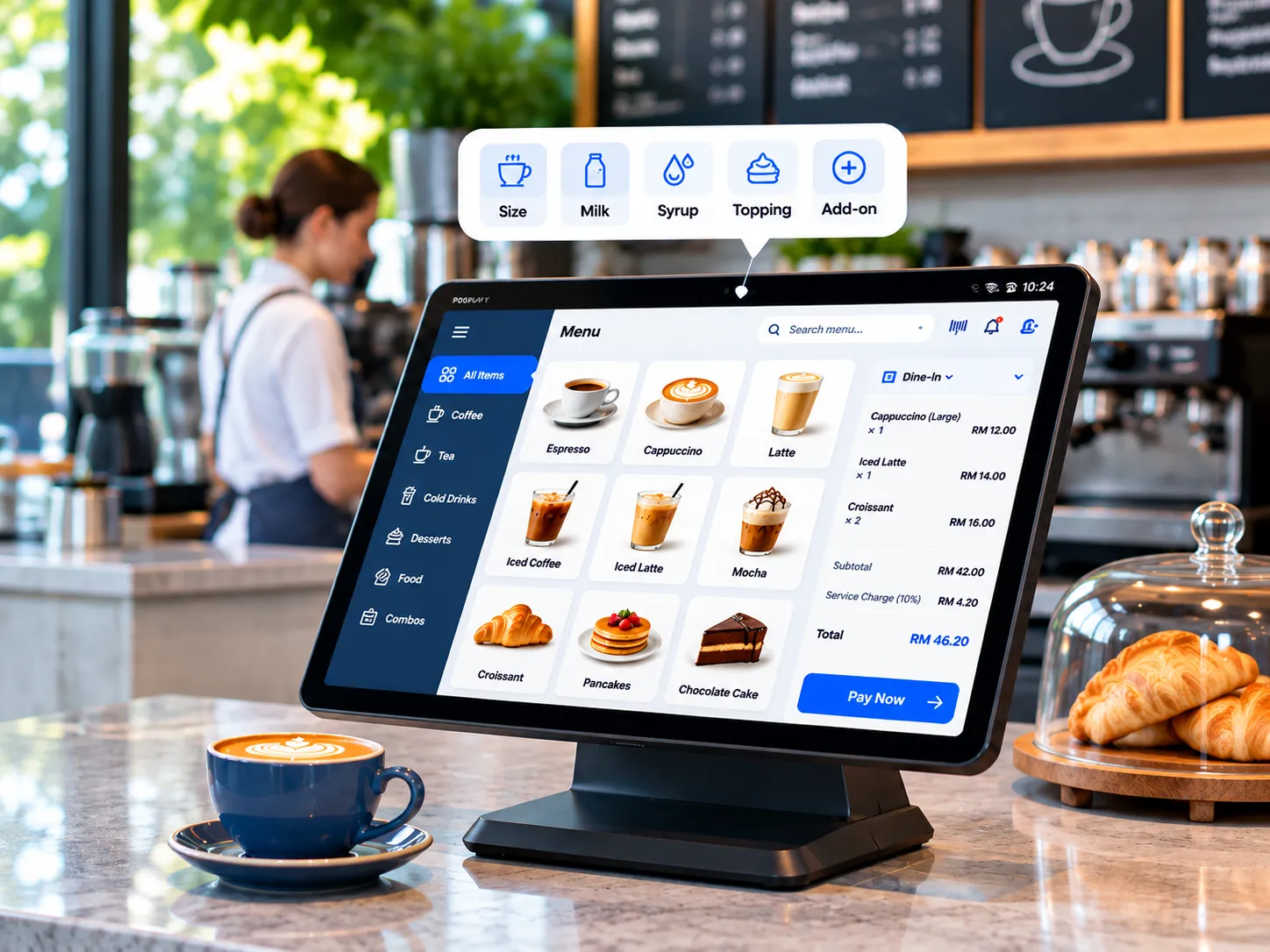
Take coffee, beverage, food and snack orders quickly from an easy-to-use sales screen. Keep popular products easy to find, reduce waiting time at the counter, and keep service moving smoothly during busy hours.

Drink Customization

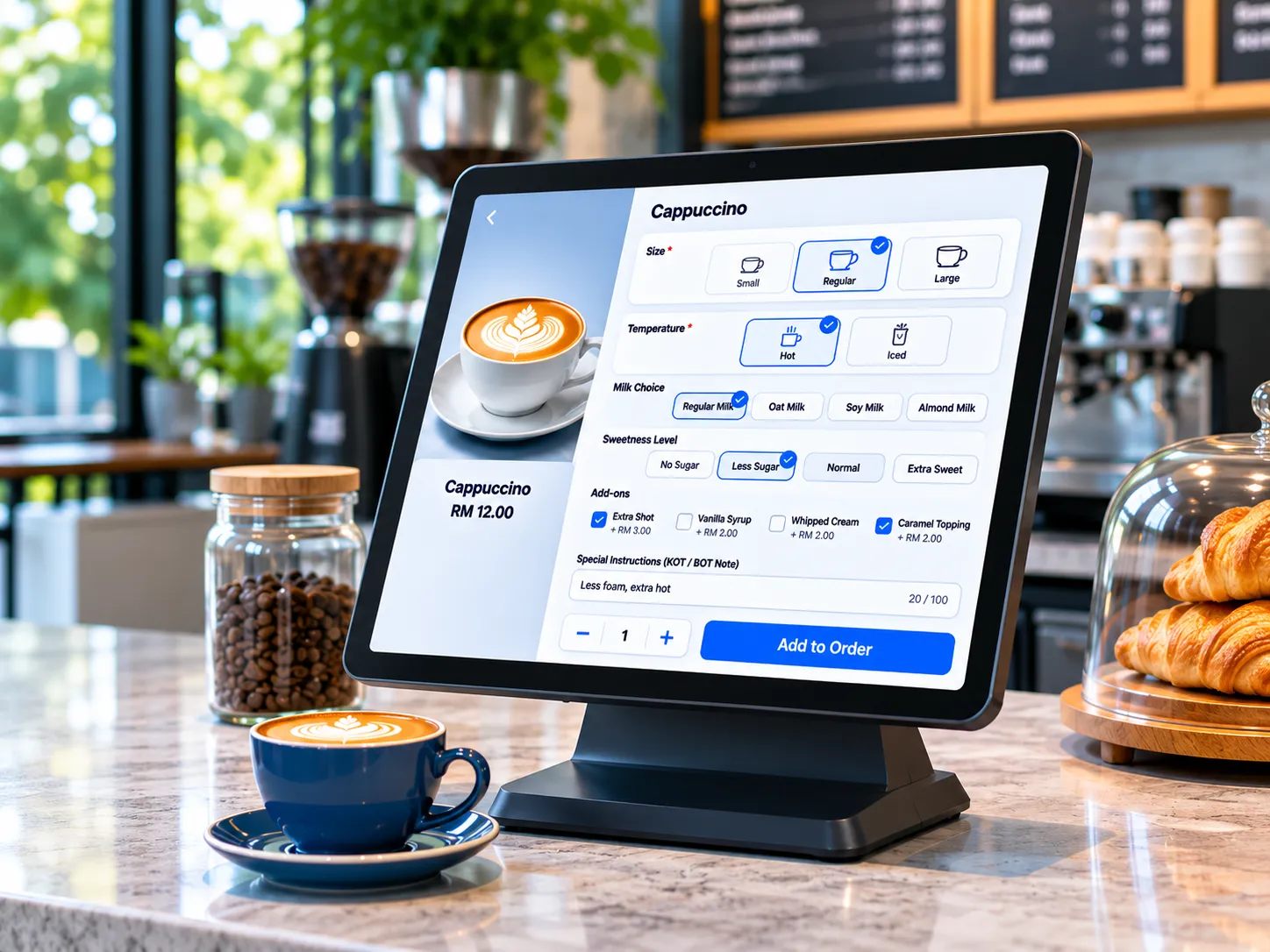
Create drinks the way your customers want them. Add sizes, variants, milk options, syrups, toppings, extra shots and other add-ons while taking the order, so baristas can send clear instructions for preparation.

Dine-In & Takeaway

Manage dine-in, delivery and takeaway orders from the same POS. Keep each order organized, apply the right service charge and delivery charges options, and make it easy for staff to handle different customer needs without confusion or delays.

Quick Payments

Make checkout simple with cash, cards and supported payment methods. Process payments quickly, handle different payment options, and provide clear printed or digital receipts without slowing down service during busy times.

Menu Management

Keep drinks, food, desserts, snacks and other products organized in clear categories. Update prices, products, modifiers and menu options easily so staff can quickly find and sell the right items.

Inventory Management

Track ingredients, raw materials, recipes, products and stock levels across your café. Know what is available, monitor stock movement, and get better control over the products you need to keep your menu running smoothly.

Customer Loyalty

Give regular customers a reason to return with loyalty points, discounts, promotions, vouchers and special offers. Track customer activity and use promotions to build stronger relationships and encourage repeat visits.

Staff Management

Manage baristas or staff access, shifts, permissions and activity from one place. Give employees the access they need for their role while keeping control over important actions and daily café operations.

Reports & Insights

See how your café is performing with sales reports, best-selling products and customer activity. Use clear business insights to understand what is selling, spot trends and make better day-to-day decisions.

A POS Designed for Busy Café Counters

A POS Designed for Busy Café Counters

Busy cafe counters need a POS that is quick and easy to use. SalesPlay gives your staff a simple sales screen where they can quickly find popular drinks, food and other menu items, customize orders and complete sales. This helps reduce waiting time and keeps service moving during busy mornings, lunch hours and peak periods.
  • Create a clean sales screen with images for coffee, tea, cold drinks, breakfast, desserts and other popular products.
  • Organize products into clear categories so staff can find items quickly.
  • Add quantities, modifiers, combos, add-ons and special instructions while taking orders.
  • Save and reopen pending orders when customers are not ready to complete payment.
  • Use multiple POS devices when your cafe gets busy and more staff need to take orders.
Build Drinks the Way Your Customers Want

Build Drinks the Way Your Customers Want

Café customers often want their drinks prepared in a specific way. SalesPlay lets you create flexible drink options so staff can take customized orders accurately without slowing down the counter. Set up product choices once and make them easy for staff to select during the sale.
  • Offer different sizes for coffee, tea, juices, smoothies and other beverages.
  • Add milk choices, syrups, flavours, extra shots, modifiers, toppings and other add-ons.
  • Set options such as hot or iced, sweetness level and other preparation preferences.
  • Create required or optional choices to control how products can be customized.
  • Include special instructions or KOT / BOT notes so the preparation team clearly understands each order.
Handle Dine-In, Takeaway and Other Orders

Handle Dine-In, Takeaway and Other Orders

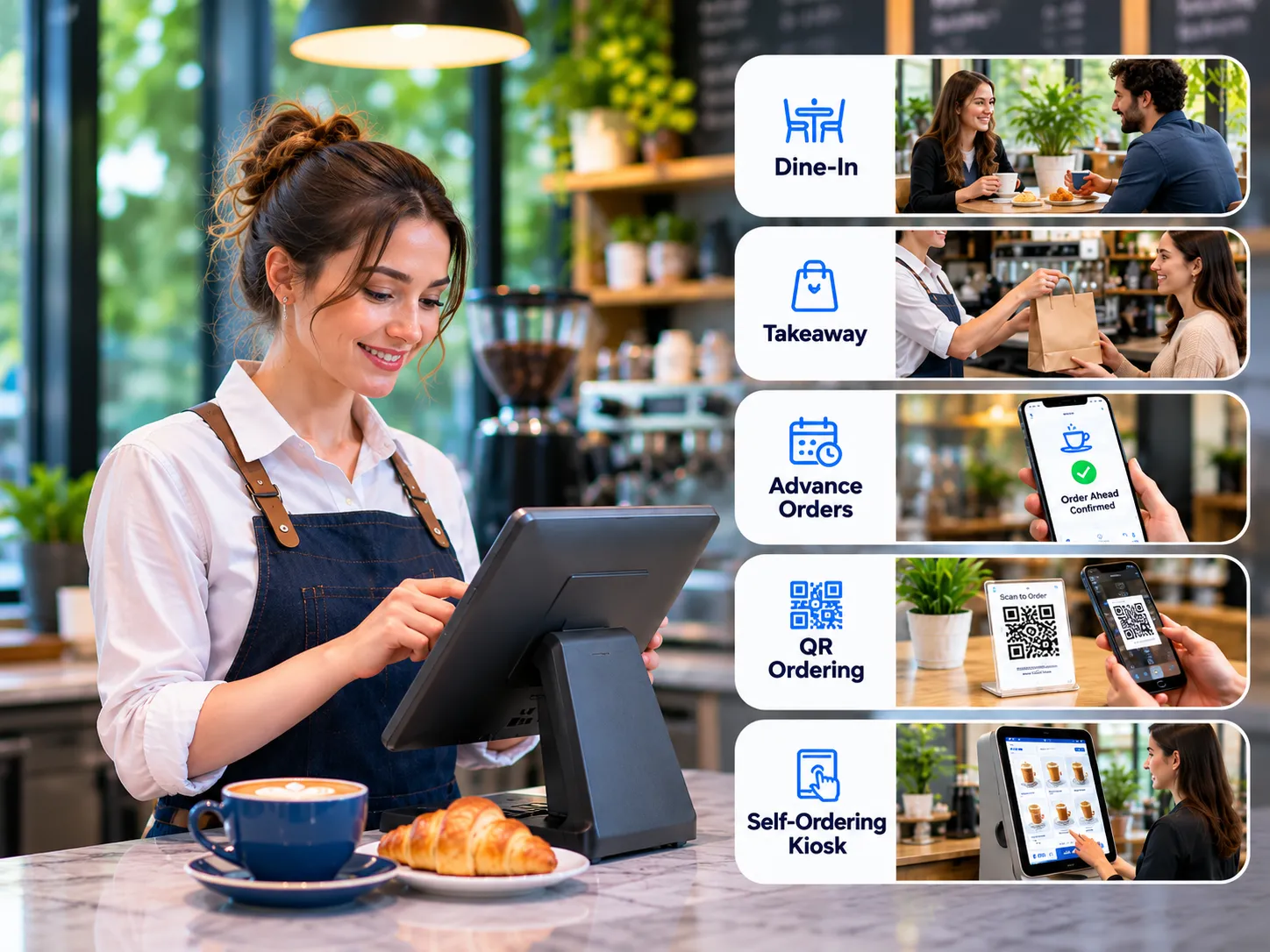
Cafés serve customers in different ways. Some customers sit down for coffee and breakfast, while others want a quick takeaway order or place an order before arriving. SalesPlay lets you manage different order types from the same POS, keeping your team organized throughout the day.
  • Manage dine-in orders for customers eating at tables or inside the cafe.
  • Process takeaway orders quickly without adding unnecessary steps at checkout.
  • Take advance orders and payments when customers order ahead.
  • Support QR ordering and online ordering options for additional sales channels.
  • Offer self-ordering kiosk options where supported, giving customers another convenient way to order.
Keep Orders Moving from Counter to Preparation

Keep Orders Moving from Counter to Preparation

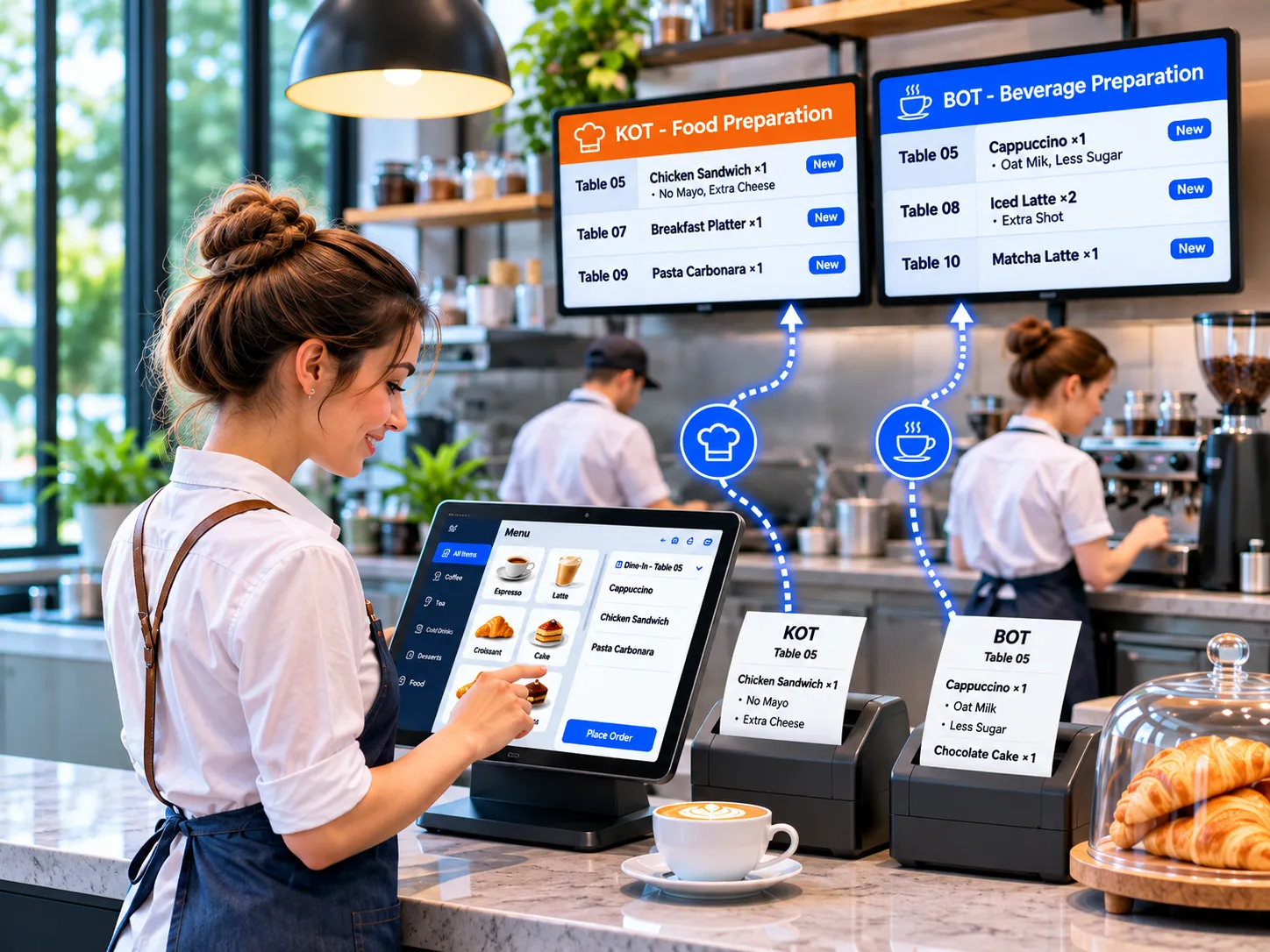
Taking an order is only the first step. Your kitchen, bar or beverage team needs clear information about what to prepare. SalesPlay helps send KOT and BOT orders to the right preparation area and keeps staff working from the same order details, reducing confusion and missed instructions.
  • Send food and beverage KOT & BOT orders to the correct kitchen or preparation area.
  • Display incoming orders on a Kitchen Display System or KOT printer for faster preparation.
  • Print special KOT notes and labels on Kitchen Order Tickets when required.
  • Separate food and beverage preparation so each team knows what to handle.
  • Show quantities, modifiers, add-ons and special instructions clearly on the order.
Make Checkout Simple

Make Checkout Simple

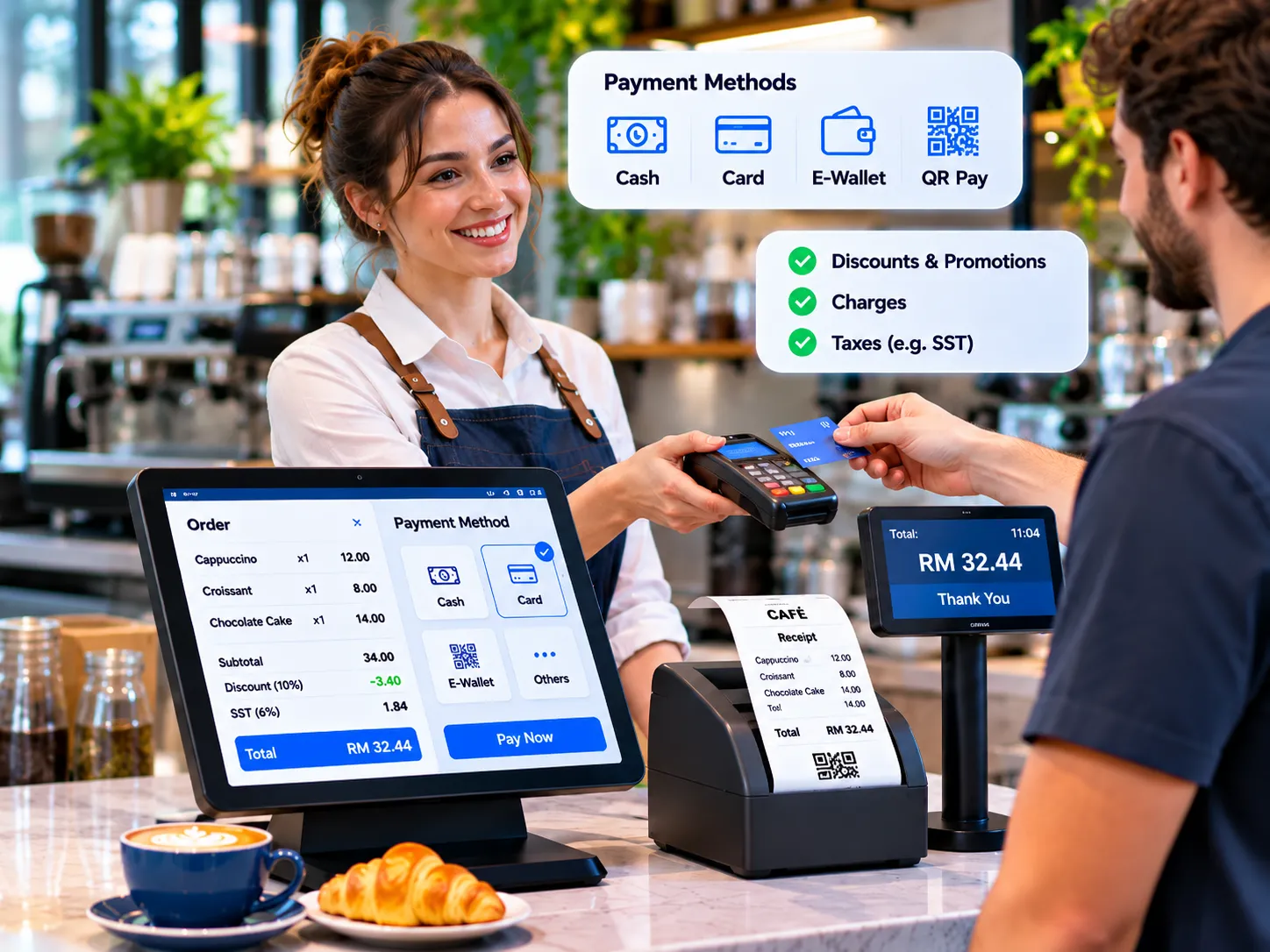
A fast checkout is important when customers are waiting at the counter. SalesPlay gives your coffee shop staff a simple way to complete payments, apply discounts and provide receipts. Support for different payment methods also makes checkout easier for different types of customers.
  • Accept cash, cards and other supported payment methods.
  • Handle multiple payment methods based on your cafe’s payment setup.
  • Apply discounts, promotions, charges and taxes before completing the sale.
  • Save pending bills and reopen them when customers are ready to pay.
  • Print or share digital receipts and use a customer display to show order details and totals.
Grow Your Café With Better Data

Grow Your Café With Better Data

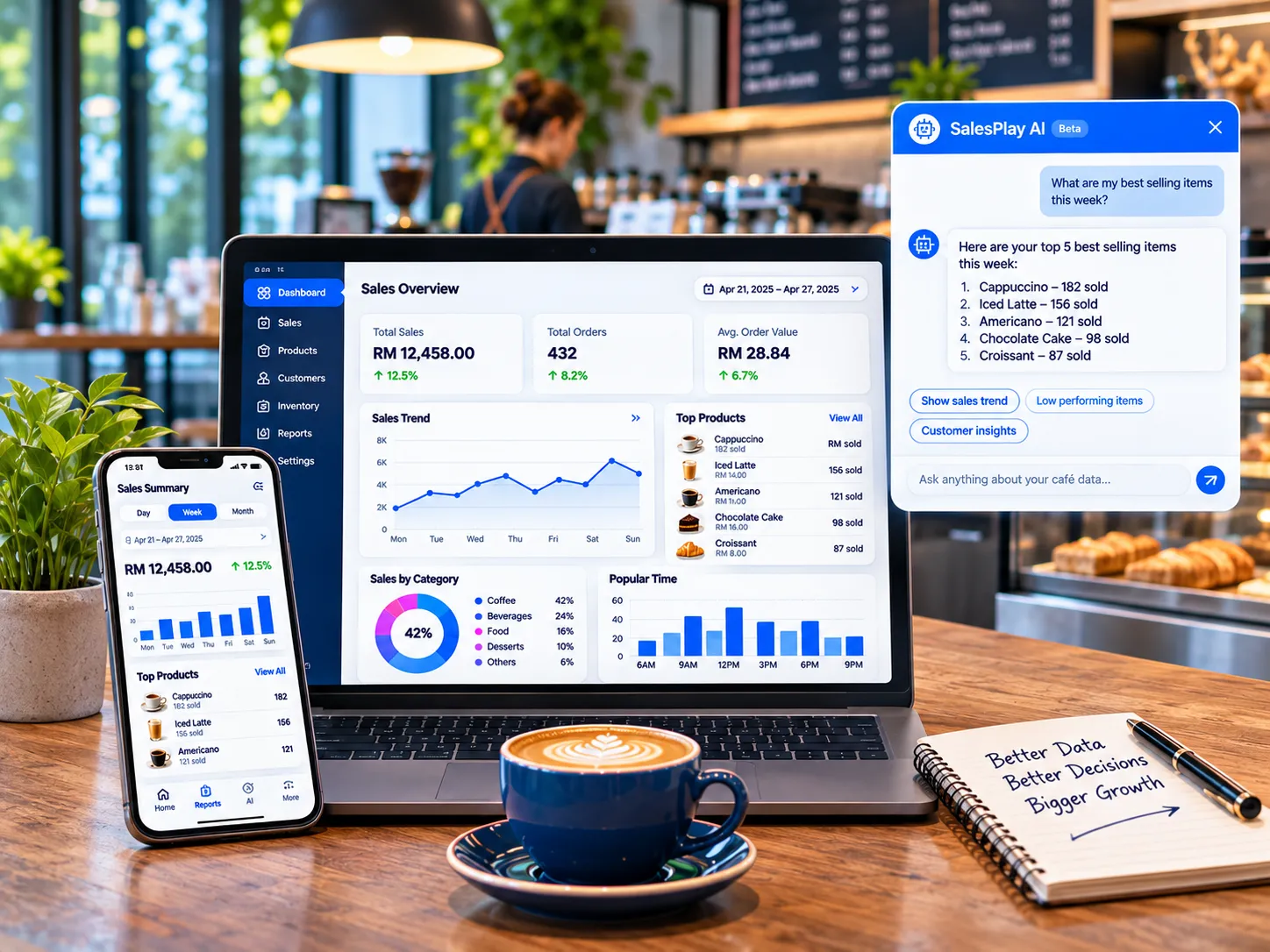
A good café POS should help you understand the business, not just process sales. SalesPlay brings sales reports, product performance and business information together so you can see what is working. With SalesPlay AI, you can also ask questions about your café data and explore trends more easily.
  • View daily, weekly, monthly and product-level sales to understand overall performance.
  • Identify best-selling coffees, drinks, food items and product categories.
  • Compare sales trends and see how your business is performing over time.
  • Find products with low sales and identify products with stronger profit potential.
  • Ask SalesPlay AI questions about sales, products, customers and profit to support better decisions.

Ready to Run Your Cafe Smarter?

Bring your Cafe orders, tables, kitchen, staff, customers, and business information together with SalesPlay POS. Serve faster. Stay organized. Understand your business better.

Salesplay app png

SalesPlay POS

Seamless Billing, Inventory, CRM and Analytics platform

SalesPlay Kitchen Display

Informs kitchen staff of the pending customer orders

SalesPlay Dashboard

Monitor sales, gross profit, net profit, taxes, and other business information.

SalesPlay Self-Order

Self-service kiosk for faster ordering and reduced queues.

FAQs

What is a café POS system?

A café POS system is software that helps cafés and beverage-focused businesses manage sales, orders, payments, products, customers, inventory and daily operations from one system. It can also support dine-in and takeaway orders, product customization, customer loyalty programs and business reporting.

A café POS system can be used by a wide range of beverage businesses, including coffee shops, espresso bars, tea shops, bubble tea shops, juice bars, smoothie bars, milkshake shops, beverage bars, mocktail bars and fresh juice shops, as well as other similar food and beverage businesses.

What features should a café POS system have?

A good café POS should support fast ordering, table & order management, menu management, drink customization, modifiers, takeaway, delivery and dine-in orders, multiple payment methods, inventory management, customer loyalty, staff permissions and sales reporting.

Can SalesPlay POS manage coffee and drink customizations?

Yes. SalesPlay POS supports modifiers and add-ons, allowing cafés to create options such as drink sizes, milk choices, syrups, toppings, extra shots and other product customizations.

Can I use SalesPlay POS for takeaway orders?

Yes. SalesPlay POS supports takeaway orders alongside dine-in, delivery and other order types, allowing your staff to manage different types of café orders from the same POS.

Can a café use SalesPlay for customer loyalty?

Yes. Cafés can use customer profiles, loyalty points, redeem, discounts, vouchers and promotions to encourage repeat purchases and reward regular customers.

Can SalesPlay POS manage café inventory?

Yes. SalesPlay provides inventory tools for managing products and stock levels. Cafés can also use recipe management to define ingredients used in prepared products and better understand ingredient usage.

Can I manage more than one café location?

Yes. SalesPlay supports multi-store operations, allowing businesses with multiple cafés or branches to manage their locations from one system.

Does SalesPlay provide café sales reports?

Yes. SalesPlay provides reports and dashboards covering sales, products, customers, inventory, payments, profit and other business information.

Can café staff have different POS permissions?

Yes. SalesPlay allows businesses to create user roles and permissions so sensitive actions such as refunds, discounts, order changes and deletions can be limited to authorized employees.

Can customers order using a QR code?

Yes. SalesPlay supports QR ordering, giving cafés another way to let customers browse the menu and place orders digitally.

✖